Surveys
TL;DR — A survey is a reusable set of questions your team asks at the door or on the phone. Each answer can also update the person’s record — adding a tag, setting their support level, and more.
What it is
A survey is a reusable set of questions you ask people during an activity. It’s the what we ask of a campaign — the script a volunteer follows at the door or on the phone.
A survey is built once and reused across as many activities as you like. The same survey can power a canvass, a phone bank, and a follow-up text.
graph TD
    A[Survey]

    subgraph Questions[" "]
        B[Question 1]
        C[Question 2]
        D[Question 3]
    end

    A --> Questions

    style A fill:#e1f5ff,stroke:#0066cc,stroke-width:3px
    style B fill:#fff4e6,stroke:#ff9800,stroke-width:2px
    style C fill:#fff4e6,stroke:#ff9800,stroke-width:2px
    style D fill:#fff4e6,stroke:#ff9800,stroke-width:2px
    style Questions fill:#f5f5f5,stroke:#666,stroke-width:2px
Questions
A survey is made of questions. Each question is one of:
- Single choice — the person picks exactly one option.
- Multiple choice — the person can pick several options.
- Essay — a free-text / open-ended answer.
Answers can do more than record a response
This is what makes surveys powerful: each option on a choice question can trigger an action that updates the person’s record automatically when it’s selected. The available actions are:
| Action | What it does |
|---|---|
| None | Just records the answer, no side effect. |
| Tag | Adds a tag to the person (e.g. volunteer-interested). |
| Support level | Updates how strongly the person supports your campaign. |
| Do Not Call (DNC) | Flags the person so they’re left out of future calling. |
| Lawn sign | Records that the person wants a lawn sign. |
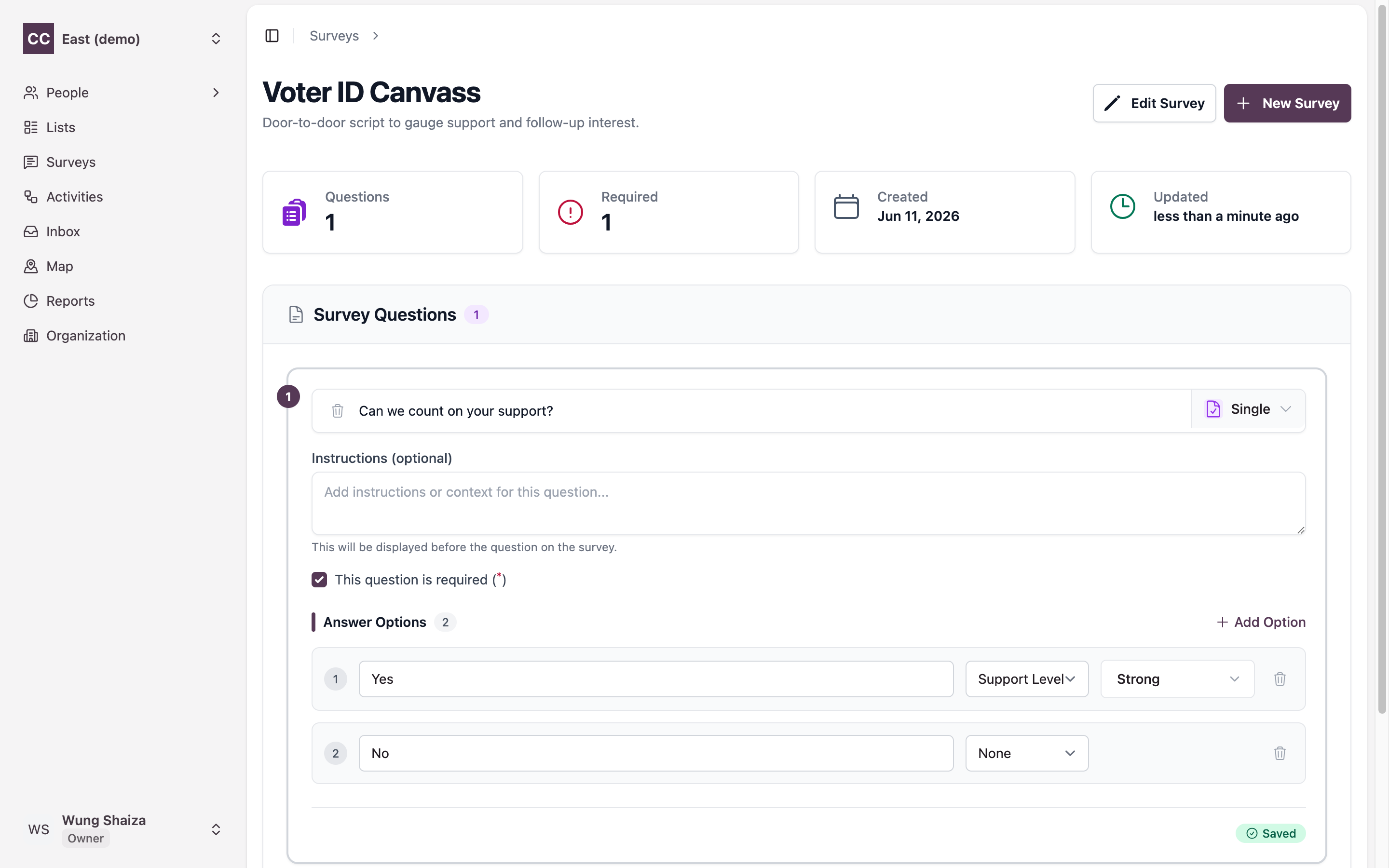
So a single question like “Can we count on your support?” can both record the answer and set the person’s support level — no extra data entry needed.
graph LR
    Q["Question option<br/>(e.g. 'Strong yes')"] --> ACT[Action]
    ACT --> P[Person's record updated]

    style Q fill:#e1f5ff,stroke:#0066cc,stroke-width:2px
    style ACT fill:#fff4e6,stroke:#ff9800,stroke-width:3px
    style P fill:#f5f5f5,stroke:#666,stroke-width:2px
In the survey editor, each question has a type and a set of answer options — and every option carries an action selector that decides what happens to the person’s record when it’s chosen.
Terms
- Survey — a reusable set of questions.
- Question — single choice, multiple choice, or essay.
- Action — what selecting an option does to the person’s record (tag, support level, DNC, lawn sign).
Related
- How it fits together — where surveys sit in the bigger picture.
- Activities — the push that runs a survey.